You’ve now outgrown the website you put together when you booked your first few sessions, and every photographer you admire seems to be on Showit.
But when it comes to Showit website design for photographers, you probably have lots of questions. Is it the right platform for your business? What does working with a Showit designer look like? And how do you find one who gets your creative style?
We’re Elle & Elle Design Studio, a sister duo designing Showit websites for photographers and other creative business owners since 2021. Showit is the only platform we build on, so we know its strengths (and its quirks!) inside and out.
Here’s everything you need to know.
Why Good Website Design Is Important for Photographers
Your website is where potential clients see your work, personality, and price point. A couple might find you through a friend’s wedding album or a venue’s vendor list, but before they inquire, they almost always check your website.
Naturally, you want to make a good impression.
For photographers, design comes with extra pressure. Your images are your product, so a cluttered layout, slow-loading galleries, or awkward cropping can make your photography look…not so great.
Good design helps you showcase yourself and your work in the best light. A well-designed photographer website:
- Frames your images so they look as stunning online
- Helps couples and families picture themselves in your photos
- Signals your price point, so you attract clients who are ready to invest in you
- Answers common questions about your process and packages
- Helps you rank on Google and AI search engines
- Gives referrals an impressive place to learn more about you and your services
When you have a good website, you also spend less time selling yourself on discovery calls because your website already prequalifies and warms up your leads.
What Is Showit? Is It a Good Design Platform?
Showit is a drag-and-drop website builder for creative businesses. It was actually originally created for photographers! Showit’s biggest difference is that instead of squeezing your content into rigid blocks or a preset grid, you (or your designer) can place images, text, and other elements anywhere on the page.
At Elle & Elle, we build exclusively on Showit, and there are a few reasons we recommend it to photographers:
- Creative freedom lets you design layouts that look truly custom and aesthetic
- Separate desktop and mobile editing means you can fine-tune how your website looks on phones
- A WordPress blog gives you access to strong SEO tools, including plugins for optimizing the posts
- The editor is easy to learn, so you can update galleries and copy yourself after launch
- Showit’s support team is available by live chat and email, and they’re very responsive
- If you’re moving from another platform, Showit can migrate your existing blog posts for you
After testing multiple platforms, Showit is the one we confidently recommend to every photographer we work with. Many website builders make you choose between a website that looks beautiful and one that performs well, but Showit gives you the freedom to make your portfolio look like a high-end gallery and the SEO tools and technical capabilities to get found and booked.
Showit Website Design for Photographers: 5 Tips from Elle & Elle
1. Show the Work You Want to Book More Of
It’s tempting to upload every session you’ve ever shot to prove your range. The problem is that potential clients book what they see. If your portfolio is half newborn sessions and half elopements, both audiences may walk away unsure whether you specialize in what they need.
Pick the type of session you want more of and build your portfolio around it. If you specialize in different types of photography, set up different service pages for them. Choose images that match the style, lighting, and mood you want to be known for, even if that means cutting a few favorites.
2. Design Your Mobile Website Separately
Many of your future clients will find you on their phones, often while scrolling Instagram or Googling. Most website builders handle mobile by stacking your desktop layout into one long column. For photographers, that can mean landscape images get shrunk down or text crowding your best photos. No bueno.
Showit lets you design the mobile version of each page separately from the desktop version. You can swap in vertical crops, reorder sections, and shorten text blocks so your mobile website feels intentional, is easy to navigate, and showcases your work well.
This is a huge benefit to using the platform, especially for photographers, so ask your Showit designer whether that’s something they include in the process.
3. Get in Front of the Camera, Too!
Photographers spend so much time behind the camera that they often forget to step in front of it. Your clients are choosing the person who’ll be next to them during one of the most emotional days of their lives, or the person who’ll get their toddler to laugh during family photos. They want to know who that person is!
Add photos of yourself throughout your website, such as a portrait of you smiling, behind-the-scenes shots of you working, and maybe even a short welcome video to introduce yourself. On your about page, share details clients can connect with, like what you enjoy doing outside of work. Make sure the photos of you are high quality, too. NOT a blurry selfie or an old picture from 2019.
4. Blog Your Sessions for Local SEO
Your blog can also bring new clients to you through Google and AI search engines, such as ChatGPT. When a couple searches for “[venue name] wedding photographer” or a family searches for “family photographer in [your town],” blog posts about sessions at those locations give Google something to match.
It’s a good practice to document your sessions on your blog in an SEO-friendly way. Here are a few tips:
- Include the venue or location name in your post title, first paragraph, and image file names
- Write a few paragraphs about the session instead of posting a gallery with no text
- Add descriptive alt text to your images, like “bride and groom at sunset on [beach name]”
- Link to related posts, like other sessions at the same venue or your pricing page
Over time, these posts build a library of pages that help couples and families find you when they’re searching for a photographer in your area.
5. Hire a Designer for Creatives
If you’re rebranding, the designer you choose will largely determine how your business looks for the next several years.
A general web designer can build a website that works okay. But a designer who works with creatives understands how photographers book clients, what couples look for in a portfolio, and how to make your images the star of every page.
This is especially important during a rebrand. A new logo and color palette are only one piece of it. Your website also needs to reflect who you’ve become as a photographer and the prices you plan to charge.
When you’re comparing designers, look for:
- A portfolio with photographers or other creatives whose websites you resonate with
- A strategy phase before design starts so your website is built in a purposeful way
- Experience with Showit specifically
- A clear plan for mobile design, SEO, and other technical aspects of the design process
- A walkthrough or training at the end, so you can update your website on your own in the future
At Elle & Elle, every Showit website starts with a wireframe that maps out your user journey, calls to action, and SEO plan before Marielle starts designing.
We’ll also walk you through your finished website so you can add new galleries and blog posts without needing us.
Stately Photos, Example of Showit Website Design for Photographers
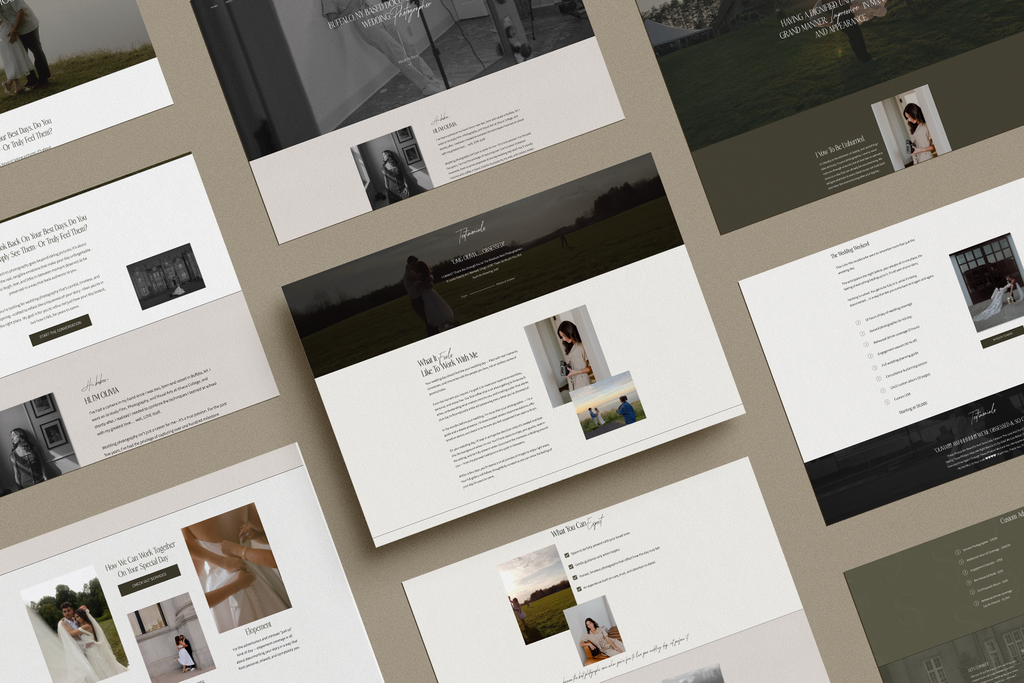
Olivia is the destination wedding photographer behind Stately Photos, where she documents adventurous couples in a candid, storytelling style.
She launched her business in 2020 with two weddings on the calendar and has since grown to more than 30. Her work had leveled up along the way, but her DIY website still felt “beginner.” She also had a hard time getting couples to understand who she was and why she photographs weddings the way she does.
We designed her new brand and Showit website to give couples a feel for Olivia herself, with plenty of space for her values and personality alongside her galleries. The result feels timeless and warm, which is exactly the kind of experience she gives her couples on their wedding day.
Since her new website launched, Olivia’s inquiries have more than doubled. She went from 3 to 5 inquiries a month to 7 to 10, with couples reaching out who already feel connected to her.
FAQs
How much does a custom Showit website cost for photographers?
A custom Showit website for photographers usually costs several thousand dollars, depending on how many pages you need and whether branding is included. Templates are a more budget-friendly option, but they often take hours of customizing.
At Elle & Elle, custom Showit website design starts at $6,000. If you’d like a full rebrand along with your website, The Ellevated Suite starts at $7,500 and includes brand strategy and a custom brand identity.
You can learn more on our services page.
Is Showit better than Squarespace or WordPress for photographers?
For most photographers, Showit offers the best mix of design freedom and functionality. Squarespace is easy to use, but its layouts follow a set grid, and the mobile version of your site is based on your desktop design, so you have less control over how your images look on phones. WordPress is powerful for SEO, but it takes more technical upkeep, like managing plugins, updates, and security, and there’s no dedicated support team to call.
Showit gives you the creative control photographers want, with a WordPress blog built in and a support team you can reach when you need help.
Is Showit good for SEO?
Yes, Showit is a strong platform for SEO. You can customize the title tag and meta description for each page, add alt text to your images, and design a mobile website that’s easy to use on phones. Your blog is on WordPress, so you can use SEO plugins to optimize every post.
Like any platform, your rankings still depend on what you put into it, so things like keyword-focused copy, regular blog posts, and properly sized images make a big difference, but Showit gives you everything you need to succeed.
Get Custom Showit Website Design for Photographers with Elle & Elle
Elle & Elle Design Studio is run by two sisters who turned a shared love of design into a studio for creative business owners. Marielle is our Showit web designer, the one who’ll notice if a button is a hair off-center, and Michelle is the brand strategist and identity designer who makes sure every visual choice has a reason behind it.
Together, we’ve helped photographers, planners, and other creatives replace DIY websites with ones that bring in the clients they’ve been dreaming of.
If your photography has grown past your current website, check out our services to see how we work, or reach out to start planning your new Showit website!
